
Getting Started with Payout Possibilities
Welcome to the MassPay introduction guide to payout methods! MassPay is a versatile global payout orchestration platform that supports a variety of payout methods to help you reach your global audience. From traditional bank transfers to e-wallets to crypto, MassPay enables you to send payouts across borders, currencies and payout methods with ease. In this guide, we'll introduce you to the different payout methods supported by MassPay and help you choose the right ones for your needs. Whether you're executing payouts for employees, contractors, freelancers, suppliers, or anyone associated with your business, MassPay has you covered.
Getting Started with Payout Possibilities
Welcome to the MassPay introduction guide to payout methods! MassPay is a versatile global payout orchestration platform that supports a variety of payout methods to help you reach your global audience. From traditional bank transfers to e-wallets to crypto, MassPay enables you to send payouts across borders, currencies and payout methods with ease. In this guide, we'll introduce you to the different payout methods supported by MassPay and help you choose the right ones for your needs. Whether you're executing payouts for employees, contractors, freelancers, suppliers, or anyone associated with your business, MassPay has you covered.
What are possible payout methods?
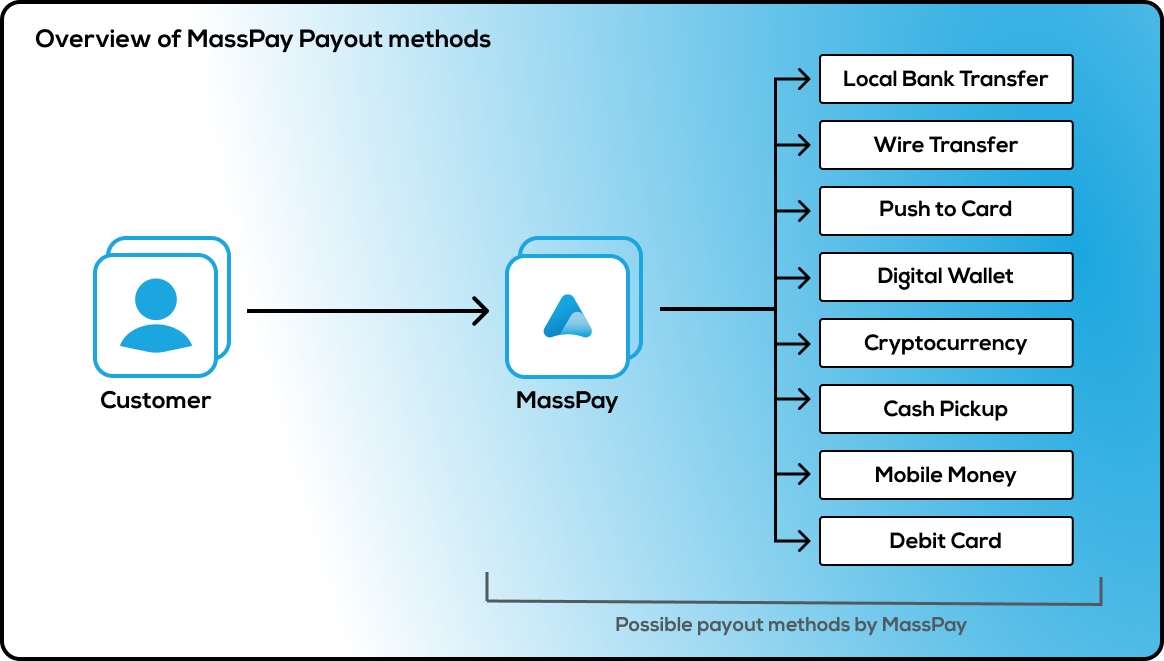
- Local Bank Transfer: This payout method allows you to transfer funds directly to a recipient's local bank account. To use this method with MassPay, you will need to provide the recipient's bank account details and the transfer will typically take 1-3 business days to process.
- Wire Transfer: A wire transfer is a fast and secure way to transfer funds directly from one bank account to another. To use this payout method with MassPay, you will need to provide the recipient's bank account details and the transfer will typically take 1-2 business days to process.
- Push to Card: This payout method allows you to send funds directly to a recipient's debit or prepaid card. To use this method with MassPay, you will need to provide the recipient's card details and the transfer will typically be processed instantly or within a few hours.
- Digital Wallet: A digital wallet is an electronic device or online service that allows you to make payments and store digital currency. To use this payout method with MassPay, you will need to provide the recipient's wallet address and the transfer will typically be processed instantly or within a few hours.
- Cryptocurrency: MassPay supports a range of cryptocurrencies, including Bitcoin, Ethereum, and many others. To use this payout method, you will need to provide the recipient's cryptocurrency wallet address and the transfer will typically be processed within a few hours.
Learn more about cryptocurrencies in our addition guide...
- Cash Pickup: This payout method allows recipients to collect their funds in cash from a designated location. To use this method with MassPay, you will need to provide the recipient's name and the pickup location, and the transfer will typically be available for pickup within a few hours.
- Mobile Money: Mobile money is a digital wallet that allows you to store, send, and receive money using your mobile phone. To use this payout method with MassPay, you will need to provide the recipient's mobile money account details and the transfer will typically be processed instantly or within a few hours.
- Debit Card: This payout method allows you to transfer funds directly to a recipient's debit or prepaid card. To use this method with MassPay, you will need to provide the recipient's card details and the transfer will typically be processed instantly or within a few hours.
Is it safe to use MassPay payout methods?
We take security very seriously, and we maintain several measures to ensure the safety of our customers' information and transactions.
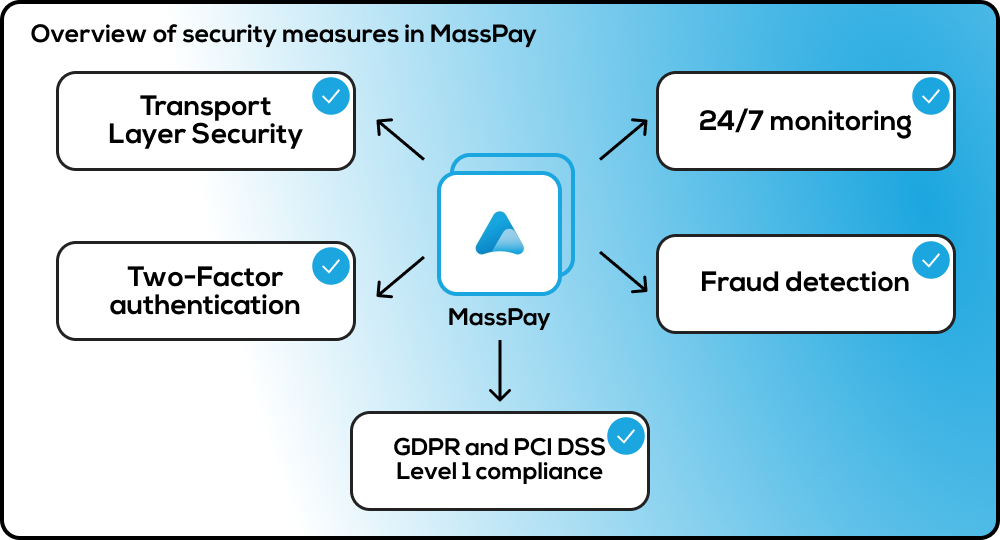
Here are some of the security features we offer:
- TLS: MassPay has implemented Transport Layer Security (TLS) protocol version 1.2 to ensure secure communication between clients and the MassPay API. TLS 1.2 is the latest version of TLS and provides secure data transmission by encrypting communication between the client and the server. This encryption ensures that sensitive information such as login credentials, payment details, and personal information cannot be intercepted by unauthorized third parties. By implementing TLS 1.2, MassPay ensures the security and integrity of all data transmitted over its platform, providing a safe and reliable payment experience for all users.
Learn more about TLS...
- Two-Factor Authentication: MassPay offers two-factor authentication to add an extra layer of security to customers accounts. This means that in addition to a username and password, customers must also enter a unique code sent to their mobile device or email address before customers can access their account.
- Compliance: MassPay is fully compliant with international security standards and regulations, such as GDPR (General Data Protection Regulation) and PCI DSS Level 1 (Payment Card Industry Data Security Standard).
MassPay has implemented PCI-DSS Level 1, which is the highest level of certification available for payment processing companies. PCI-DSS Level 1 compliance means that MassPay has met strict security standards set forth by the major credit card companies to ensure the protection of sensitive information during payment processing.
Learn more about GDPR and PCI DSS Level 1...
- Fraud Detection: MassPay has implemented advanced fraud detection measures to identify and prevent fraudulent transactions. We use machine learning algorithms to analyze transaction data and identify suspicious activity.
- 24/7 Monitoring: MassPay's security team is monitoring our systems 24/7 to detect and respond to any security threats or incidents.
MassPay prioritizes the security of your information and transactions. We maintain multipole measures to ensure that our platform is safe and secure - and we will continue to implement new measures as they become available and are applicable.
What about fees?
Every payout carries a fee. The fee is set in your agreement with MassPay and configured on your account, and it depends on the country, the payout method, the currency and the amount. A fee can have a fixed part, a percentage part, and a minimum, so the fee on a small payout can be a large share of the amount — for example, a method with a minimum fee of 5 USD charges that 5 USD on a 3 USD payout as well as on a 300 USD one. Because the configuration is specific to your account, this documentation does not list fee amounts. The API tells you the exact fee before any money moves:
- Before you choose a method — the catalog. Gets a list of Companies and their best payouts service offerings for the given country code and the other catalog endpoints take an
amountquery parameter and return thefeeof each service for that amount, together with the estimatedexchange_rate. Withoutamount, the fee shown is for a 200 USD payout. Always pass the amount you intend to send, because of minimum fees. - Before you commit — the quote. Initiate a payout transaction returns the payout in status
PENDINGwith its exactfeeandexchange_rate. Nothing is charged until you commit it. If you decide not to, let it expire; an uncommitted payout costs nothing. To price a payout without creating one, adddry_run=trueto the initiate request. - After the fact — records. The same
feeis on everypayoutwebhook, on Get status of a payout by payout token and in the transaction history.
Who pays the fee
The fee is charged in the source currency, on top of the payout amount. It is never deducted from the amount the recipient receives: destination_amount is always source_amount converted at exchange_rate.
- Default: the wallet that funds the payout is debited the payout amount plus the fee.
- Fee wallet: your account can be configured so that the funding wallet is debited the payout amount only and the fee is charged to a separate wallet of yours. Ask your account representative to set this up.
When using the Wire Transfer payout method, the receiving bank may charge an added fee that MassPay does not control. MassPay covers all other fees involved in the payout process.
Fees when a payout does not complete
- Not committed (
PENDING→EXPIRED): nothing is charged. - Rejected at initiation or commit (
ERROR): nothing is charged. - Cancelled after commit (
CANCELLED): the amount debited for the payout is returned to the wallet it was taken from. MassPay does not charge a cancellation fee.
Overall, MassPay's goal is to provide a cost-effective and transparent payout solution, with clear and easy-to-understand fee structures. For questions about the fees configured on your account, contact [email protected] or your account representative.
What are the payout statuses?
A payout moves through these statuses. You see them in the status of Initiate a payout transaction, Get status of a payout by payout token and the payout webhook.
| Status | Meaning | Final? |
|---|---|---|
PENDING | Created and priced, not yet committed. The quote is valid until expiration (2 minutes by default). Nothing has been charged. | No |
PROCESSING | Committed and accepted by the payout provider. The funds are in flight. | No |
READY_FOR_PICKUP | The funds have reached the destination and are waiting to be collected or settled — for cash pickup, the recipient can collect them. | No |
HOLD | Paused for a compliance or document review. The payout resumes or is cancelled when the review ends. | No |
COMPLETED | Delivered to the recipient. | Yes, see below |
CANCELLED | Did not complete: rejected by the provider or the receiving bank, returned, or cancelled at your request. Any amount debited for it is returned. | Yes |
ERROR | Failed validation at initiation or at commit. Nothing was charged. The reason is in status_reason. | Yes |
EXPIRED | A PENDING payout that was not committed before expiration. Nothing was charged. | Yes |
SCHEDULED | Reserved for payouts queued for a later processing time. | No |
A completed payout can still be cancelled. When the receiving bank returns the funds after the fact — for example, a closed account discovered days later — the payout moves fromCOMPLETEDtoCANCELLED, the funds are returned to your wallet, and you receive anotherpayout.statuswebhook. TreatCOMPLETEDas final for your workflow, but keep handling laterCANCELLEDevents for the samepayout_token.
Why a payout was cancelled or failed
status_reason carries the reason for a CANCELLED or ERROR status. It is text for people, not a code: show it, log it, but do not branch on it. Values you will see include:
status_reason | What happened |
|---|---|
Requested cancellation, Requested by client, or the reason you sent with the request | You asked for the cancellation with Request payout transaction cancellation. |
Validation error | The provider rejected the beneficiary details, or the payout could not be delivered after repeated attempts. |
Payer no longer available | The payout method was withdrawn before the payout was processed. Pick another destination_token from the catalog. |
Expired quote | The provider's rate quote expired before the payout was processed. |
A bank return code and description, such as R01 - Insufficient Funds or R03 - No Account/Unable to Locate Account | The receiving bank returned the funds. |
The provider's own wording, such as Beneficiary bank rejected the payout or Blocked Account | The provider declined the payout. |
No DOB, Compliance review, Blacklisted, Account validation failed (NO_MATCH): ... | The payout failed MassPay's checks at commit (ERROR). |
A validation message such as Missing address line 1, Destination token does not support the provided destination currency, or Please upload a government issued ID at the following link: ... | The payout failed validation at initiation (ERROR). |
Requesting a cancellation
Request payout transaction cancellation asks the provider to stop a committed payout. The response's cancelation_status is CANCELLED when it could be stopped at once, CANCELLATION_REQUESTED when the provider has to confirm, and CANCELLATION_FAILED when it is too late. A request does not guarantee a cancellation; the final outcome arrives as a payout.status webhook or on Get status of a payout by payout token.
CANCELLED_AT_LATER_TIME in the transaction history
CANCELLED_AT_LATER_TIME in the transaction historyThe transaction history lists money movements, so a cancelled payout appears there twice:
- the original payout, with status
CANCELLED_AT_LATER_TIMEand the time it was created, and - a second
payoutrow with statusCANCELLEDand the time the cancellation happened, which is when the funds came back.
The client dashboard shows the first row as "Cancelled at Later Time". The payout itself has only one status, CANCELLED, which is what Get status of a payout by payout token and the webhook report. CANCELLED_AT_LATER_TIME never appears outside the history.
Sending the same client_transfer_id twice
client_transfer_id twiceclient_transfer_id is your reference for a payout, and MassPay uses it to stop the same payout from being created twice. A second initiate request with a client_transfer_id that another payout of yours already carries — by default one that is PENDING and not yet expired, SCHEDULED, PROCESSING, READY_FOR_PICKUP, HOLD, COMPLETED or CANCELLED — is rejected with 400 Bad request:
{
  "title": "Bad request.",
  "message": "The request was invalid or malformed. Please ensure that the request body conforms to the required format and that all required parameters are included.",
  "code": 400,
  "error": {
    "reason": "Error initiating payout",
    "details": ["Duplicate client id. Existing payout token: payout_ba4275f2-bae1-488d-9d6f-20af1cd83574"]
  }
}
The details text names the payout that already carries that client_transfer_id, so you can look it up instead of treating the outcome as unknown. The rejected attempt is recorded as a payout in status ERROR with the same client_transfer_id, which is why it also shows up in your history. Two uniqueness modes. By default a client_transfer_id becomes free again once the payout that holds it has EXPIRED or ended in ERROR (a PENDING quote that has passed its expiration also frees it), so you can retry a failed payout under the same reference. An account can instead be set to strict uniqueness: every value is reserved for good, whatever happened to the payout that used it first, and a retry has to carry a new client_transfer_id. If a retry after an ERROR is rejected as a duplicate, your account is in strict mode. Ask your account representative which mode you are in or to change it.
To retry a request that may or may not have reached us — a timeout, a dropped connection — send it again with the sameIdempotency-Keyheader. MassPay then returns the original response instead of creating anything new. See Idempotent Requests.
What is the availability of each payout method?
MassPay supports a wide range of payout methods across multiple countries, markets and currencies. However, the availability of specific payout methods may vary depending on several factors including, but not limited to, the country of the sender, the country of the receiver, and the currency used for the transaction.
It is important to note that certain payout methods may not be available in some countries due to regulatory or legal restrictions. These change often, too, and we will do our best to keep everyone informed of these changes as they occur.
The catalog is the source of truth for what you can pay out, where, and in which currency. It is served by the API, so it is always current:
- Gets a list of countries where payouts services offered returns every country you can pay into.
- Gets a list of Companies and their best payouts service offerings for the given country code returns, for one country, each payout method with its currencies, limits and fee. Gets a list of Companies and their service offerings for the given country code returns the same for every provider rather than only the best one.
- Returns provided service returns the details of one payout method by its
destination_token.
Each environment serves its own catalog. The staging catalog contains only the test payers described on the Testing page, with full bank coverage for the United States and Canada only. It does not show what production offers. To learn which methods you can use in a country, call the catalog with your production credentials, or ask your account representative. See Getting Started with Catalogs for how the catalog endpoints fit together.
Availability changes over time, as providers and regulations change. Re-read the catalog rather than caching it for long, and handle a destination_token that is no longer offered: the API returns an error when you initiate a payout to a method that is no longer available.
Updated 23 days ago
What’s Next
Let's get started with our technical guide that describes how to create your first payout.